Tool features
Why the MOT Type 1 calculator is metric and specification-aware
The MOT Type 1 calculator keeps compacted depth, loose-volume adjustment, tonnes, bulk-bag weight, and supplier increments visible while treating compliance as something the calculator cannot certify.
UK-first sub-base inputs
Start in metres and millimetres, then receive cubic metres, tonnes, bulk bags, and editable UK supplier rounding.
Metric sub-base footprint
Measure one or several paved sections in metres while keeping the compacted course depth in millimetres.
Declared density override
Replace the provisional loose value with reliable merchant or product information for the supplied Type 1.
Compacted and loose volumes
Show cubic metres in the finished layer and after the editable supply adjustment before calculating tonnes.
Tonnes and bulk bags
Compare merchant tonnage with whole bulk-bag counts using the actual nominal bag weight offered.
UK merchant rounding
Apply quoted price basis, minimum quantity, delivery charge, and sales increment to the calculated sub-base.
What changes the result
Type 1 is a material specification context
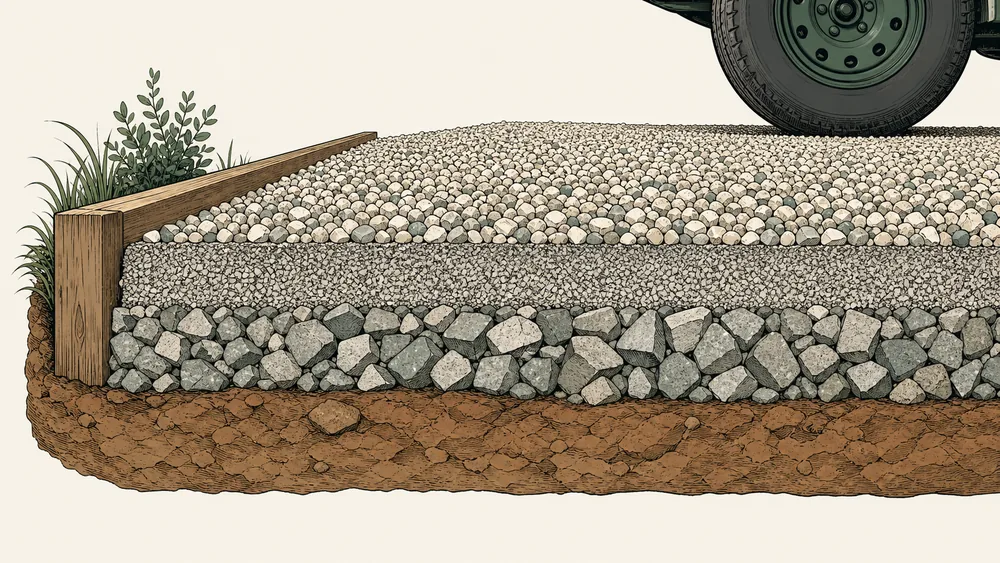
MOT Type 1 refers to an unbound mixture used in UK highway-work specifications. Retail terms such as hardcore, sub-base, or recycled Type 1 do not automatically prove the same grading or compliance.
The calculator handles quantity only. It starts from the compacted layer, applies an editable loose-volume factor, converts with bulk density, and rounds to tonnes or bulk bags without claiming a structural design.
Use the MOT Type 1 calculator for quantity only, then verify the selected material and contract requirements against the current country-specific MCHW documents and the supplier declaration.
Why the default is metric
The UK preset uses metres for area, millimetres for compacted thickness, tonnes for weight, and an editable 850 kg bulk-bag size.
When a deep layer needs separate review
Current MCHW requirements are published in country-specific document sets. A quantity result does not determine formation strength, layer thickness, roller passes, or specification compliance.


Reference data
MOT Type 1 quantity and layer reference
Use official project requirements and supplier data for final specification; the calculator keeps the quantity assumptions editable.
Metric planning inputs
finished compacted layer
The current MCHW library linked below is a specification entry point; the applicable country and contract documents must control actual works.
Metric Type 1 chain
visible from input to purchase
Confirm compacted cubic metres, loose-volume factor, declared product density, bulk-bag weight, and merchant rounding as separate inputs.
Why it matters
Keep compacted tonnes and loose delivery distinct
Visible thickness
The preset is an input, not a universal patio requirement.
Loose adjustment
Change it using supplier yield or reliable site experience.
Bulk-bag size
Replace the default with the actual merchant package weight.
The copied estimate identifies compacted volume, loose volume, density, extra material, tonnes, and bulk-bag rounding separately.
Where it fits
Sub-base takeoffs in familiar UK units
Use the calculator for material quantity, then confirm design and compliance with the responsible specification or professional.

Patio formation
Estimate the Type 1 layer separately from bedding sand and paving units.

Domestic drive
Enter compacted thickness explicitly and keep the surface course out of this total.

Merchant collection
Convert tonnes to whole bulk bags using the advertised package weight.

Loose delivery
Round to the merchant or quarry increment and include the quoted delivery charge.
Method
From compacted sub-base dimensions to tonnes and bulk bags
The MOT Type 1 calculator measures the finished layer in metric units, expands it for loose supply, and rounds the resulting weight to the way the merchant actually sells it.
Measure the compacted sub-base
Enter the finished footprint and selected course thickness in metric or familiar regional dimensions.
Identify the merchant product
Choose the Type 1 context, confirm the loose bulk density, and keep specification compliance outside the preset.
Convert cubic metres to the sale
Apply the loose factor and extra material, then round tonnes or bulk bags to the merchant’s stated increment.
Live worked example — waiting on your inputs
Enter the sub-base dimensions and the MOT Type 1 calculator will show compacted cubic metres, loose volume, tonnes, bag counts, and the rounded merchant order.
FAQ
MOT Type 1 calculator questions for UK sub-base orders
The MOT Type 1 calculator FAQ explains tonnes, bulk bags, compaction, current specification context, supplier data, and why a quantity result is not proof of compliance.
How many tonnes of MOT Type 1 do I need?
Enter the square-metre footprint and compacted depth in millimetres. The MOT Type 1 calculator converts the installed volume to loose purchase volume, applies the selected bulk density and extra allowance, then rounds tonnes upward.
How many bulk bags of Type 1 make a tonne?
It depends on the package weight. At 850 kg, one tonne is about 1.18 bags, but purchasing must round to whole bags. Enter the merchant’s actual bag weight rather than assuming every bulk bag is identical.
Is all hardcore MOT Type 1?
No. Hardcore is broad retail language, while Type 1 has a specification context. Confirm the product description, grading, source, and project requirements before using its density or ordering it for a specified layer.
Does this prove the material complies with current MCHW requirements?
No. The MOT Type 1 calculator estimates quantity only. Check the applicable country, contract documents, supplier declaration, test information, and current MCHW requirements separately.
Why can bulk-bag totals differ from the tonne result?
Bulk bags are rounded to whole packages using the entered nominal bag weight. The weight printed or declared by the merchant may not equal one tonne, so package and bulk-delivery totals can differ.
Calculation references and review
The MOT Type 1 calculator uses explicit metric geometry and NIST conversion factors with editable loose bulk density. The current Standards for Highways MCHW library is cited for specification context; the calculator does not reproduce, select, or certify a contract requirement.
- Standards for Highways — current MCHW specification library
- ASTM C29/C29M-23 — bulk density and voids in aggregate
- NIST SP 811 Appendix B.9 — conversion factors by quantity
Reviewed by the gravelcalculator.app editorial team on . Review scope: unique project logic, geometry, unit factors, bulk-density language, purchasing assumptions, interface labels, and calculation boundaries.